top of page

Synthelyzer® ECAD Plugin
for Altium
Follow these steps to install:
1. In Altium go to Help -> About -> Extensions and Updates
2. Go to the "Purchased" tab, and select "Synthelyzer Toolkit Derating, MTBF, ..."
3. Install
Note: Altium restart is required after install
4. To launch the toolkit:
-Open a schematic
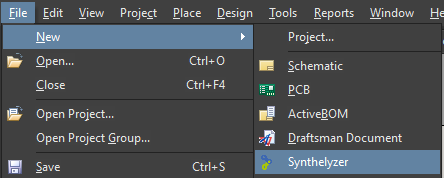
-Select: File -> New -> Synthelyzer
Note: License is required to unlock the full Synthelyzer potential.
bottom of page